
If you’re evaluating Stable Audio for product features, content pipelines, or creative tools, you usually have three questions: what it can generate, where the Stable Audio API documentation lives, and what the Stable Audio API pricing will look like at scale. This guide walks through those decisions with a developer-first lens, including a practical Stable Audio 2.5 API flow and a careful way to verify version-specific pricing such as Stable Audio 2.0 pricing 2026. 3-line takeaway
The sections below focus on the parts that usually matter once you move past the landing page: how Stable Audio is exposed through different surfaces, what to read in the docs first, how to think about pricing, and where version-specific questions need extra verification
3-line takeaway
Start with the provider’s docs (auth → request schema → async/streaming → errors) before you tune prompts.
Budget by what the provider bills on (credits, duration, retries), not by “one request = one cost.”
Treat “Stable Audio 2.0 pricing 2026” as a verification task: confirm model IDs and the pricing table on the platform you’re actually using.
Jump to
What is Stable Audio and what can you generate with it today?
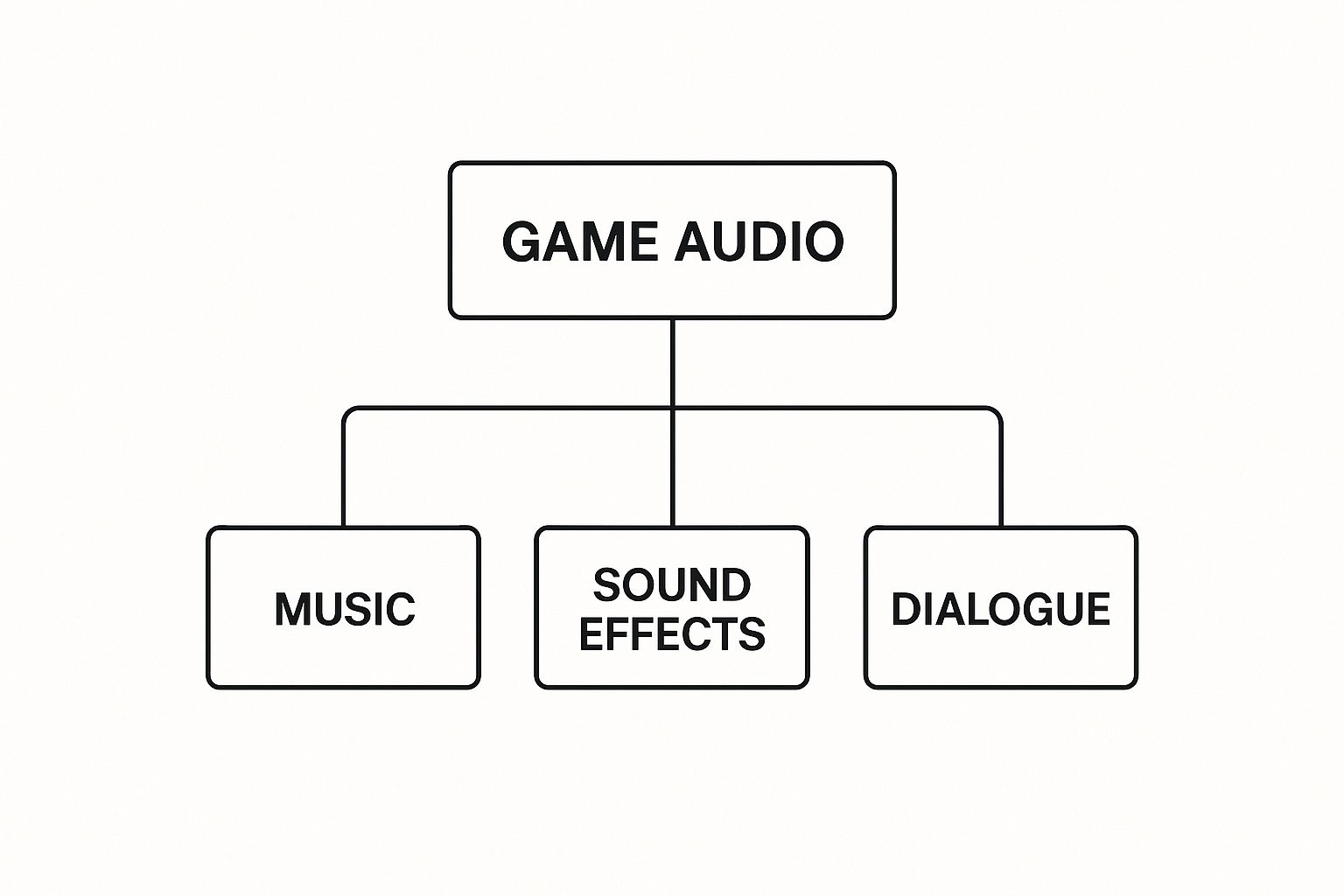
At a practical level, Stable Audio is an audio generation system you can use to create short musical ideas, sound design elements, and variations—either from text alone or by transforming existing audio, depending on the specific product surface and API you integrate. Most teams evaluate it for: rapid prototyping, content variants (ads, social), game SFX/music sketches, and creator tooling where latency and cost matter.
In day-to-day usage, you’ll typically see two broad generation modes:
Text-to-audio: you describe what you want (genre, instruments, mood, tempo, mix), and the model generates new audio.
Audio-to-audio: you provide an input audio clip and ask for a transformation (variation, re-style, inpainting-like edits, or “same idea, different production”), subject to what your chosen endpoint supports.
For the canonical product overview and any official positioning around capabilities, start from the Stable Audio landing page on Stability AI: Stable Audio by Stability AI. From there, decide whether you’re a solo creator (interactive UI may be enough) or a developer/team (you’ll want an API provider path with predictable billing, rate limits, and support expectations).

Stable Audio “partners” vs “official API”: what’s the difference for developers?
Developers often run into confusion because “Stable Audio” can be accessed through different entry points: Stability AI’s own product surfaces, an official API, and partner platforms that host or expose models as managed endpoints. The difference matters for everything you care about in production: auth, quotas, observability, retries, and pricing display.
A simple way to think about it:
One concrete partner-style example is the model listing experience you’ll see on providers such as fal (useful for quickly understanding endpoint type and price display): Stable Audio 2.5 (audio-to-audio) model page.
Before you write code, decide which “surface” you’re shipping on (official vs partner). Then lock model ID + pricing page URL + docs URL in your project README so your team can always verify what’s deployed.
Where to find Stable Audio API documentation (and what to read first)
If your immediate goal is Stable Audio API documentation, start with the provider-specific reference for the endpoint you plan to ship. For example, if you’re integrating a partner endpoint, you can begin with the API reference here: Stable Audio 2.5 audio-to-audio API documentation.
What to read first (in order) to avoid wasting hours:
Authentication: how API keys are passed, which headers are required, and how scopes/permissions work.
Request schema: exact field names, data types, min/max values (duration limits are often the first surprise).
Response schema: where the output audio URL/blob appears, plus any metadata you need for attribution/logging.
Async vs sync: whether generation is queued and requires polling/callbacks, and how long results remain available.
Error codes & rate limits: especially 401/403 auth errors, 429 throttling, and timeout behavior.
Treat the documentation as the source of truth for parameter names and defaults—even small mismatches (seconds vs milliseconds, duration vs duration_seconds) can produce confusing failures.
Authentication and API keys: common pitfalls before your first request
Most “my first request failed” issues are not model problems—they’re auth, environment, or quota issues. Use this checklist before you debug prompts.
Pre-flight checklist
Store the API key in an environment variable (avoid hardcoding into repos or client apps).
Confirm the key is for the correct workspace/project (teams often have multiple).
Verify model access is enabled (some providers gate certain models, regions, or tiers).
Check usage caps/credits before load testing (a sudden stop can look like a network bug).
Ensure your server clock is accurate if the provider uses time-based signatures (varies by provider).
Common errors → likely causes → quick fixes
Because limitations can differ between official and partner surfaces, always cross-check the exact endpoint docs you are calling.

Request schema basics: prompt, duration, and input audio (audio-to-audio)
In Stable Audio API documentation, the most important fields are the ones that determine (a) what gets generated and (b) how much you pay. While exact names vary by provider, you’ll commonly see:
prompt: your text description (genre + instrumentation + mood + structure + mix notes).duration/duration_seconds: target output length. This often affects cost and runtime.input_audio(audio-to-audio): either an upload, a URL, or a base64 payload—plus optional parameters that control how strongly the output adheres to the input (field names differ).Optional seed / randomness controls: if supported, these help reproduce outputs; if not supported, you’ll use workflow-level consistency tricks (covered below).
A minimal “shape” for an audio-to-audio request (pseudo-structure; verify exact keys in your endpoint docs):
Set
API_KEYin your environmentSend a request with:
prompt: “Lo-fi hip hop beat, warm vinyl noise, 85 BPM, mellow keys, tight kick”duration_seconds: 15input_audio: your clip reference (URL/upload/base64 per docs)Receive a response containing:
an output audio URL or file reference
a request/job id for tracking (especially for async)
Avoid relying on undocumented defaults. If the docs don’t clearly state a default (for duration, sample rate, or strength), set it explicitly in your request so production behavior doesn’t change when the provider updates.

How to call the Stable Audio 2.5 API end-to-end (a practical flow)
A production-ready Stable Audio 2.5 API integration is less about a single POST request and more about the surrounding workflow: asset preparation, job control, download/storage, and observability. One helpful conceptual walkthrough (especially if you’re using node-based tooling) is the partner tutorial here: Stable Audio in Comfy docs.
A practical “0 to 1” flow looks like this:
Prepare assets
If you’re doing audio-to-audio, normalize the input clip: consistent loudness, trimmed silence, and a supported format/size (exact requirements depend on your provider docs).
Precompute metadata you’ll want later: user id, prompt version, model id, and a content policy flag if your app has one.
Submit the generation request
Store the full payload you send (minus secrets) for later debugging and reproducibility.
Attach an idempotency key if the provider supports it (prevents double-charging when retries happen—provider-specific).
Handle async execution
Many audio generations are queued; prefer an async job pattern if available.
Implement polling with backoff, or webhooks/callbacks where supported.
Download + store outputs
Persist the resulting file in your own storage (S3/GCS/R2) so you’re not dependent on temporary provider URLs.
Store metadata: model version, parameters, timestamp, and any seed-like field.
Reuse, iterate, and A/B
Save prompt templates and “known good” settings for each use case (ad sting, game UI SFX, lo-fi loop).
Batch-generate variations and pick winners using either human review or lightweight audio feature checks.
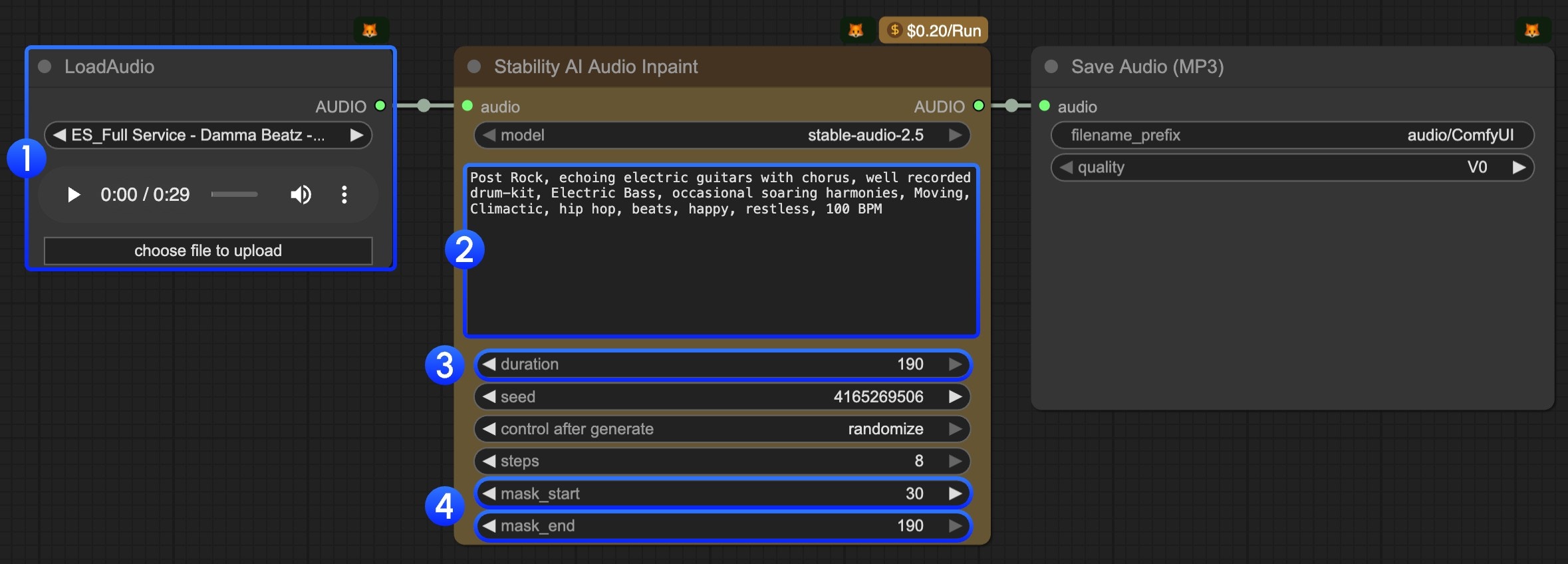
Text-to-audio vs audio-to-audio: which endpoint pattern fits your use case?
Choosing the right endpoint pattern is the fastest way to get better output with fewer retries (and fewer surprises on your bill).
If your provider offers both, it’s common to use text-to-audio for initial drafts, then audio-to-audio to “lock in” a direction and produce controlled variants.
Making outputs more consistent: seeds, iteration, and prompt structure
Consistency is usually the difference between a fun demo and a shippable feature. Your goal is to reduce randomness in inputs (prompt, settings, references) so you don’t waste budget brute-forcing.
If your endpoint supports seeds
Persist the seed with every generated asset.
Keep prompts stable and only change one variable at a time (instrumentation, BPM, or mood—not all three).
If your endpoint does not support seeds (or seed behavior varies)
Use a fixed prompt template and constrain it with clear musical + mix requirements.
Use audio-to-audio with a consistent reference clip to anchor structure.
Batch-generate a small set (e.g., 4–8) and pick the closest match instead of repeatedly regenerating one-by-one (this often reduces “drift” in your selection process).
A reusable prompt structure that tends to stay on-target:
Style/genre: “minimal techno, warehouse vibe”
Tempo & groove: “125 BPM, steady four-on-the-floor”
Instrumentation: “tight kick, offbeat hat, mono bass”
Mood: “dark, tense, hypnotic”
Mix notes: “punchy low end, controlled highs, light reverb”
Negative constraints: “no vocals, no long intro, avoid jazz chords”
For creator-friendly iteration, you can also prototype prompt templates and variations in a music app like MelodyCraft before hardening them into API presets.
Stable Audio API pricing: how credits map to real cost
Stable Audio API pricing can be straightforward or confusing depending on the platform: some bill by credits, some show per-request price, and many effectively price by output duration (and sometimes quality settings). The most reliable starting point for official pricing changes and how credits are defined is Stability AI’s update post: API pricing update.
To estimate cost without guessing, build your budget model around three questions:
Billing unit: credits, seconds, requests, or a hybrid?
What counts as usage: successful generations only, or do failed/retried jobs also consume credits? (This varies by provider—verify in the billing docs.)
Ceilings and tiers: max duration per call, concurrency, and whether higher tiers unlock better throughput.
A simple estimation method you can apply today:
Determine your average requested duration (e.g., 10s, 15s, 30s).
Determine your expected retry rate (e.g., 5–15% early on in production; tune down as you improve prompts and validation).
Multiply by the credit-per-unit table from your provider and apply a buffer.
Cost range example table (plug in your provider’s numbers)
The key is that “1,000 generations” is not a cost number until you define duration, endpoint type, and retry behavior.
Text to Audio vs Audio to Audio pricing: what to check before shipping
Even when both modes are available, text-to-audio vs audio-to-audio can be priced differently (or have different caps). Before you ship, do this 7-point check so you don’t discover unit economics in production.
Launch checklist (pricing + limits)
Confirm the exact endpoint(s) you’ll call and their unit price (credits/seconds/requests).
Confirm max duration per request and whether longer audio requires chunking.
Confirm concurrency limits (requests per minute, parallel jobs).
Confirm failure and retry billing rules (provider-specific; don’t assume).
Confirm whether input audio upload/download bandwidth affects cost (usually separate, but varies).
Confirm whether “quality” or “steps/iterations” parameters change price (if exposed).
Confirm output retention window (how long the provider hosts the generated file).
If any of the above isn’t explicit in docs, treat it as a risk and test with a small paid pilot.
Provider pricing example: what “$0.2 per audio” means in practice
On some partner platforms, you’ll see a simple label like “$0.2 per audio.” The right way to interpret that is: “$0.2 per request under the default assumptions for this endpoint.” Your actual cost can be higher or lower depending on what the provider considers a billable unit.
Use the model page pricing display as your starting point, then validate against billing docs and invoices. Example: Stable Audio 2.5 audio-to-audio model page.
What commonly changes the real cost (often provider-dependent, so treat as inference until confirmed):
Duration overrides: longer audio may cost more even if the UI shows a single number.
Retries: network retries or timeouts can create duplicate jobs if you don’t use idempotency.
Parameter changes: “high quality” modes, additional passes, or advanced features can change billing.
Batching: generating 4 variations in one call vs 4 separate calls may be priced differently (depends on API design).
If you want predictable spend, log: endpoint name, duration, payload size, job id, and final billed units per request—then reconcile weekly.
Stable Audio 2.0 pricing 2026: is it a separate plan and how to verify it?
People search “stable audio 2.0 pricing 2026” because they’re trying to determine whether “2.0” is billed differently from newer versions (like 2.5) or whether it’s rolled into a unified credit table. The safest approach is not to assume—it’s to verify using a repeatable trail.
Here’s a clean verification workflow:
Start with official pricing updates: check Stability AI’s pricing update page for how credits map to models and whether version names are explicitly called out: API pricing update.
Confirm the model name/version on your provider: look for the exact model identifier (e.g., “stable-audio-2.5” vs “stable-audio-2.0”) in the endpoint listing and docs.
Cross-check on the billing page/invoice: identify which SKU/model id is actually being billed when you run a test generation.
Save evidence for your team: keep a snapshot (date + URL) of the pricing page and the model id you used so pricing discussions don’t become guesswork later.
This approach works whether you’re using an official API surface or a partner marketplace—because in both cases, the “real price” is what the billing system records for the model id you executed.
If you can’t find Stable Audio 2.0 pricing: likely reasons (and what to do)
If you can’t locate a separate line item for 2.0, it’s usually because of one of these scenarios:
Version roll-up: pricing is listed under a broader “Stable Audio” or “Audio” category instead of a “2.0” label.
Model deprecation or rename: the platform may have moved users to a newer model id without emphasizing the old name.
Different entry point: the official product surface and a partner surface may show pricing differently.
Enterprise-only terms (inference): some usage rights or pricing may be negotiated via sales rather than public tables.
What to do next:
Contact platform support with your model id, request id, and a screenshot of where you expected to see pricing.
Run a controlled test (one request) and check how it appears on the invoice/export.
Document the outcome in your engineering notes, including the date, in case pricing shifts again.
Licensing and commercial use: what teams should confirm before publishing audio
Before you publish anything generated with Stable Audio, confirm licensing and commercial use terms for the exact surface you used (official platform vs partner platform). Terms can differ by provider and by plan, so always validate on the relevant terms pages rather than relying on community summaries.
A practical compliance checklist for teams:
Confirm whether commercial use is permitted on your plan and via your chosen endpoint.
Confirm attribution requirements (if any) for published audio.
Confirm whether you can use outputs in ads, games, podcasts, or stock libraries (terms often differ by distribution type).
Confirm data handling: whether prompts/audio inputs are retained, and whether they may be used for training (provider-specific).
Confirm your internal policy for prohibited content (e.g., impersonation, copyrighted melodies, brand sound-alikes).
This is not legal advice—treat it as an operational checklist to ensure you ask the right questions early.
Stable Audio vs Suno vs Udio: when Stable Audio is the safer choice
When teams compare Stable Audio with Suno and Udio, the “best” choice depends on deployment constraints, workflow, and risk tolerance—not just raw output quality. Stable Audio becomes the safer choice in a few common cases:
You need clearer signals around deployment and portability (e.g., interest in smaller/edge-capable audio models, as discussed in reporting like TechCrunch: Stability AI releases an audio generating model that can run on smartphones).
You need an API-first integration path with explicit model IDs and predictable observability.
Your organization is especially sensitive to IP risk and wants to base decisions on documented terms and reputable reporting, not only community anecdotes.
A simple decision table:
For another perspective on output differences, you can also review community comparisons (and then validate by testing your own prompts): Udio vs Suno comparison overview.
The questions people ask most: quality, vocals/lyrics, and IP risk
Q: Is Stable Audio “high quality” compared to other generators?
A: Quality is strongly dependent on endpoint/version, duration, and prompt discipline. For most teams, the practical measure is “how many generations until we get an acceptable output,” because that drives both UX and cost.
Q: Can Stable Audio generate vocals and lyrics?
A: It depends on the specific Stable Audio version and the platform surface you’re using (some endpoints focus on instrumental/sound design). Verify the capability list in your provider’s docs and test with a short evaluation set.
Q: How controllable is it (structure, tempo, instrumentation)?
A: Control improves when you (1) specify tempo/groove, (2) constrain instrumentation, (3) keep duration short during iteration, and (4) use audio-to-audio when you need to preserve timing/structure.
Q: What about IP risk?
A: No model eliminates risk. Your safest operational stance is: follow platform terms, avoid prompting for “exactly like” living artists or recognizable songs, keep logs for provenance, and run a review process for commercial releases. If you’re evaluating research directions and risk framing, you can also skim relevant academic discussions (for technical context): https://arxiv.org/html/2506.19085v1
Troubleshooting Stable Audio outputs: fixes for the 5 most common failures
Most Stable Audio “failures” are fixable with tighter constraints, shorter iteration loops, and better input validation. If you’re building a feature (not just experimenting), treat troubleshooting as part of your product design: define acceptable output, enforce request constraints, and log everything.
Here are the five most common issues and two immediate adjustments for each:
1) The output drifts off-prompt (wrong genre/instruments)
Adjustment A: Move key constraints to the front: “Instrumental, no vocals. 90 BPM. Acoustic kit + electric bass.”
Adjustment B: Add negative constraints: “avoid EDM supersaw, avoid orchestral strings.”
2) The music feels structureless or meandering
Adjustment A: Shorten duration while iterating (e.g., 8–15 seconds) and only scale up after you get the right motif.
Adjustment B: Specify structure cues: “short intro, main loop, clean ending” (supported behavior varies, but it often helps).
3) Clipping, harsh highs, or distortion
Adjustment A: Add mix constraints: “no clipping, controlled highs, moderate loudness.”
Adjustment B: Normalize your input audio (for audio-to-audio) and avoid extremely loud references.
4) Wrong duration (too short/too long)
Adjustment A: Ensure you’re setting the correct duration field name/unit from the docs.
Adjustment B: If the endpoint has a max duration, chunk requests and stitch downstream.
5) Style inconsistency across variations
Adjustment A: Use a fixed prompt template and keep a single “style line” constant across requests.
Adjustment B: Prefer audio-to-audio with a consistent reference clip to anchor timbre and groove (when available).
For hands-on workflow tips around Stable Audio generation and iteration, the Comfy tutorial and practical guides are also useful references: Stable Audio tutorial and a practitioner-oriented walkthrough on DigitalOcean: https://www.digitalocean.com/community/tutorials/stable-audio-music-generation
Debugging API errors: timeouts, rate limits, and malformed inputs
When output quality is fine but your integration is flaky, debug like an API engineer, not like a prompt engineer. Use a consistent incident checklist:
Log a request id (from the provider response) and attach it to your app’s job id.
Store the raw payload you sent (redact secrets) so you can reproduce.
Validate inputs before sending:
audio format, duration, and file size (per your endpoint docs)
required fields present and within allowed ranges
Implement backoff for 429s: exponential backoff + jitter; cap max retries; avoid thundering herds.
Handle timeouts explicitly:
use async job submission if available
increase client timeout only if the provider recommends it
treat timeouts as “unknown state” and reconcile by job id, not by blindly retrying
If you’re using the Stable Audio 2.5 audio-to-audio endpoint on a partner provider, keep the API reference open while you debug field names and constraints: Stable Audio 2.5 audio-to-audio API documentation.

Make Ready-to-Publish Music in Minutes 🎵
Go from idea to finished track quickly. No technical skills required.