An AI music generator can turn a short prompt into a beat, instrumental, or full vocal track in minutes. The best results come from a simple workflow: choose the right style, lock in mood and BPM, generate a few variations, then export the take that fits your goal. This guide covers the practical steps, prompt structure, and finishing checks that make AI music feel usable instead of random.
From here, we move from the big-picture definition into the part that matters most: how to set the brief, choose the right workflow, and decide where MelodyCraft fits when you want a usable draft instead of a random first take.

Need a faster way to turn prompts into music?
Use MelodyCraft to sketch songs, test ideas, and export a cleaner first draft in less time.

What is an AI music generator and what can it create today?
An AI music generator is software that creates music from inputs like text prompts, lyrics, or reference audio. Today’s tools can generate:
Instrumentals / background music (loopable cues, lo-fi beds, cinematic textures)
Beats and full arrangements (intro/verse/chorus-style sections)
Songs with vocals (melody + sung vocals, sometimes with harmonies)
Lyrics (optional) in some AI song generator workflows
The boundary: AI can be fast and surprisingly musical, but it doesn’t guarantee perfect control. You may not get an exact melody you hear in your head, flawless pronunciation, or studio-clean mixing every time. Think of it as a “drafting engine” that still benefits from human direction (prompting) and light finishing.
Another key limitation is consistency: the same prompt can produce different results across takes. That’s why a workflow that includes variations, selection criteria, and small edits matters more than trying to “one-shot” the perfect track.

Text-to-music vs AI song generator: what’s the difference?
In practice, people use “AI music generator” for both. But the use case is the cleanest way to separate them:
If you need 15–60 seconds of “doesn’t distract” music, text-to-music is usually enough. If you want a chorus people remember, you’re in AI song generator territory.

The inputs that change your results most (genre, mood, BPM, structure)
If you want better results from an AI music generator, prioritize structure words, BPM, and mood over long lists of instruments.
Why? Models can “follow” high-level constraints more reliably than micro-instructions. Telling it where the chorus goes (and how it should feel) gives the engine a map. A giant instrument list often creates clutter, conflicts, and muddy mixes.
Focus on these input blocks first:
Genre + subgenre: “indie pop”, “trap”, “cinematic ambient”
Mood + energy curve: “uplifting”, “tense”, “warm and intimate”, “explosive chorus”
BPM (or tempo feel): “92 BPM”, “fast 140 BPM”, “half-time feel”
Structure words: “intro / verse / pre-chorus / chorus / bridge / outro”
Vocal notes (if needed): “female alto”, “breathy”, “clean diction”, “no rap”
Mix notes (light touch): “punchy drums”, “clean low-end”, “wide chorus”
If your prompt is getting ignored, shorten it—then move the most important 6–10 words to the front.

How to make music with an AI song generator (a step-by-step workflow)
This is a practical, repeatable way to make music with an AI song generator—whether you’re creating content BGM or a full vocal track. Each step includes a goal, how to do it, common pitfalls, and a realistic time estimate.
Step 1 — Pick a reference: what you want the listener to feel in 10 seconds
Goal: Decide the emotional “snapshot” your track must deliver quickly.
How to do it: Write a one-line brief using mood + use + platform. Examples:
“Uplifting indie pop for a YouTube channel intro”
“Dark minimalist techno for a fashion reel”
“Warm lo-fi for a podcast bed under dialogue”
If you can, also define the first 10 seconds: is it a cold open with drums? A gentle pad fade-in? A hook teaser?
Common pitfall: Describing everything except the listener’s feeling. “Synths, guitars, bass, drums” is not a brief. “Confident, bright, forward” is.
Estimated time: 3–5 minutes.
Step 2 — Write a prompt that a model can follow (copy-paste template)
Goal: Turn your creative intent into constraints the AI can execute.
How to do it: Use a template that’s consistent and scannable. Keep it to one “spine” style, then add a few high-impact details.
Copy-paste prompt template (universal): Genre + Era + BPM + Instruments + Structure + Vocal notes + Mix notes
Example 1 (instrumental / content BGM): Indie electronic, 2010s, 108 BPM. Bright plucky synths, tight kick, light guitar chops. Structure: intro 4 bars, build 8 bars, drop 16 bars, short breakdown 8 bars, final drop 16 bars, clean outro. No vocals. Mix: punchy drums, clean low end, airy top, loopable ending.
Example 2 (full song with vocals): Modern pop rock, early 2000s influence, 96 BPM. Crunchy guitars, steady drum kit, warm bass. Structure: intro, verse 1 (sparse), pre-chorus (lift), chorus (big hook), verse 2, chorus, bridge (half-time), final chorus. Vocals: male tenor, clear diction, emotional but not breathy, no rap. Mix: wide chorus, centered vocal, minimal reverb on verses.
Common pitfall: Over-styling (“dreamy cinematic trap hyperpop jazz funk”) which makes the output unstable.
Estimated time: 5–10 minutes.
Step 3 — Generate variations and select takes like a producer (not a lottery)
Goal: Create options, then choose deliberately.
How to do it: Generate 3–6 variations of the same prompt. Don’t change five variables at once—change one thing per iteration (BPM, vocal type, or structure detail).
Then score each take quickly:
Common pitfall: Keeping a “cool” take that fails your actual goal (e.g., a podcast bed that grabs attention too hard).
Estimated time: 10–20 minutes.
Step 4 — Fix structure: extend sections, rewrite lyrics, and avoid repetition
Goal: Make the song feel intentional, not looped.
How to do it (order matters):
Lock the structure first (intro/verse/chorus/bridge/outro and approximate lengths).
Rewrite lyrics to match sections (verses = story/detail; chorus = summary/slogan; bridge = contrast).
Regenerate or extend specific sections to add contrast (different drums, harmony shift, half-time).
Common fixes for AI song generator pain points:
Chorus repeats too much: specify “final chorus with added harmony and bigger drums,” or “second chorus shorter, add vocal ad-libs.”
Lyrics drift off-topic: reduce theme to one sentence and repeat key imagery.
Sections aren’t obvious: explicitly label and describe the difference (“Verse sparse, Chorus big and wide, Bridge half-time”).
Common pitfall: Writing lyrics first, then trying to force a structure afterward. It often produces awkward phrasing and repetitive hooks.
Estimated time: 15–30 minutes.
Step 5 — Export for editing: WAV vs MP3, stems, and what to do if stems aren’t available
Goal: Export the right files for your next step (posting vs editing).
How to choose:
WAV: better for editing and mastering (less compression artifacts).
MP3: fine for quick previews and drafts.
Stems (if available): best for real mixing (vocal up/down, drum punch, etc.).
If stems aren’t available, you can still improve a track with “mastering-style” edits:
EQ cleanup (roll off rumble, tame harsh highs)
Compression/limiting (control peaks, raise perceived loudness gently)
Cut-and-rearrange (trim long intros, shorten repetitive sections, create a clean ending)
Common pitfall: Editing an MP3 too heavily, then wondering why it sounds smeared—do serious work on WAV when possible.
Estimated time: 5–15 minutes.
Prompting tips that actually improve AI music quality (from real users)
The biggest quality jump usually comes from how you write, not which plugin you imagine. Community prompt guides tend to agree on three themes: word order, clear tags, and restraint. If you want a deep, real-world prompt breakdown, this community thread is a strong starting point: updated master prompting doc.
Use this simple Do/Don’t set to tighten your prompts:
A prompt architecture that works: one “spine” + one “color”
A reliable pattern is spine + color:
Spine = the main identity (genre + era + tempo feel)
Color = one twist (a signature instrument, production texture, or rhythmic feel)
Example:
Spine: “modern R&B, 88 BPM, intimate”
Color: “soft Rhodes + tight 808s, late-night vibe”
This avoids the “genre soup” problem where the AI music generator tries to satisfy conflicting instructions and ends up with a muddy compromise.
The 5 tags worth testing: BPM, era, vocal type, production style, exclusions
If you only have time to test a few variables, test these—because they often steer the output most predictably:
BPM / tempo feel: “120 BPM” vs “120 BPM, half-time feel”
Era: “80s”, “early 2000s”, “2010s”
Vocal type: “female alto”, “male baritone”, “soft breathy” (if using an AI song generator)
Production style: “dry and upfront”, “wide chorus”, “lo-fi cassette warmth”
Exclusions (negative intent): “no rap”, “no heavy reverb”, “avoid distorted guitars”
Use exclusions sparingly and plainly. Not every model supports formal “negative prompts,” but simple “no X” constraints often help reduce unwanted traits.
Why your output sounds muddy or distorted (and how to prevent it in the prompt)
Many “bad outputs” are predictable: too many elements, conflicting styles, or energy words that push everything to max. Here’s a practical fix table.
Want a cleaner way to turn ideas into finished tracks?
When you need a usable first draft instead of endless tweaking, MelodyCraft keeps the workflow simple.
Which AI music generator should you choose? A practical comparison checklist
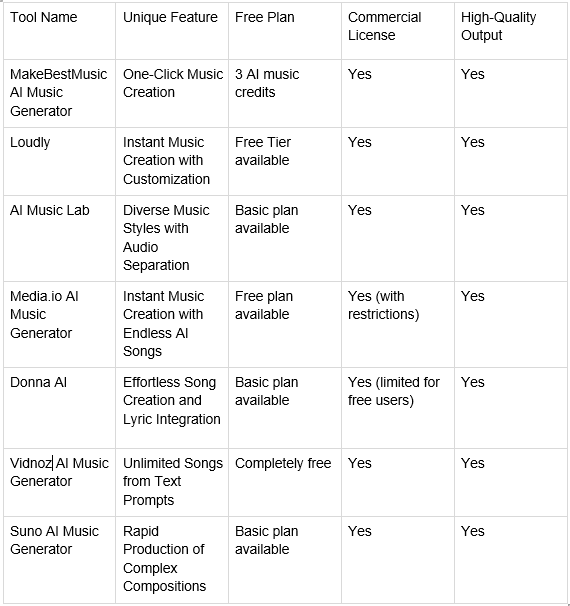
If you search “best AI music generators,” you’ll find long lists (like this overview of AI music generator options). Lists are useful, but your best choice depends on what you’re making and how you work.
Use this checklist to evaluate any AI music generator or AI song generator in under 15 minutes:
If you want one place to draft ideas quickly and iterate into finished tracks, consider MelodyCraft as your “creation hub”—especially if you value fast iteration from prompt → versions → export.
If you need vocals and full songs: what to test in the first 10 minutes
Run a quick “same prompt stress test” before committing to a tool:
Use one prompt (structure + vocal type included).
Generate 3 takes.
Compare:
Diction (are words understandable?)
Melody consistency (does the chorus feel like the same song idea?)
Hook memorability (does anything stick after one listen?)
Section contrast (verse vs chorus difference)
If Take 1 is great but Take 2–3 collapse, the tool may be harder to control for production work.
If you only need background music: how to optimize for loopability and pacing
For content BGM, the win condition is different: you want music that supports voice/dialogue and edits cleanly.
Prompt patterns that help:
“loopable ending,” “seamless loop,” “no long fade”
“minimal lead melody,” “supportive textures”
“leave space for dialogue,” “midrange not crowded”
“steady groove, subtle variation every 8 bars”
Also choose structure that editors love: 4–8 bar phrases, predictable transitions, and a clean “button ending” option.
Can you use AI-generated music commercially? What to check before you publish
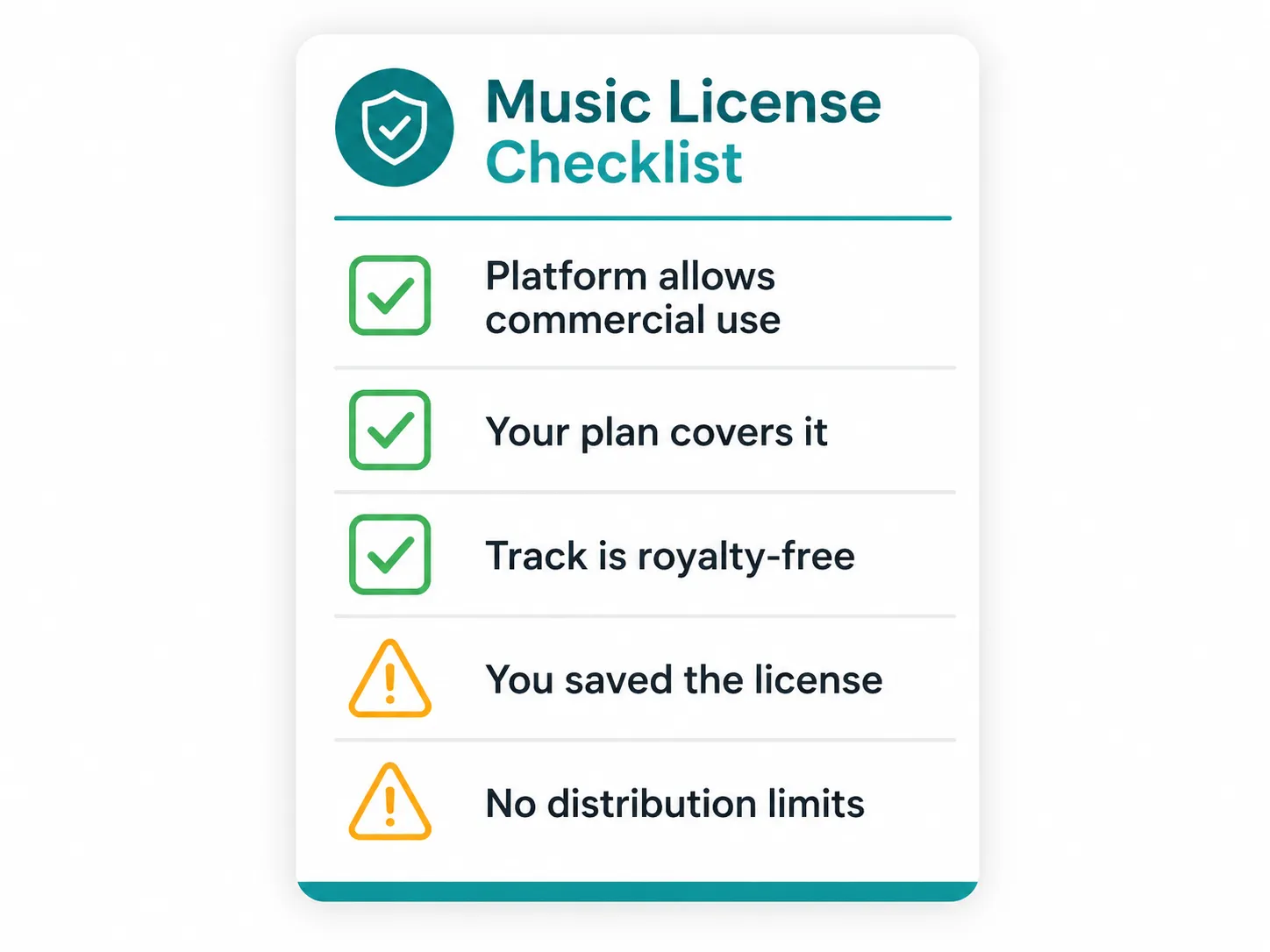
You can often publish AI-generated music commercially—but the safe answer is: it depends on the tool, your plan, and the platform. Before you upload to Spotify/YouTube/TikTok, run a quick checklist:
Confirm your license/rights for your specific account tier (free vs paid)
Check whether redistribution is allowed (streaming, selling beats, client work)
Save proof: receipts, plan status, timestamps, project IDs
Avoid “sounds-like” prompting that mimics a specific artist or song
Be ready for platform systems (like Content ID) to flag similarities
This help article is a good example of how plan terms can affect rights: Suno commercial-use overview. Always verify the exact terms for the tool you use.
Ownership and licensing can depend on your plan (free vs paid)
Many tools tie commercial rights to your subscription tier. Some allow personal use on free plans but restrict monetization, client work, or redistribution unless you’re on a paid plan. Others grant broader rights but add conditions (crediting, usage limits, or policy compliance).
Neutral best practice:
Screenshot key terms at the time you publish
Save your invoice/receipt and the generation date
Keep a simple “release folder” with exported files and notes
For a concrete example of plan-based language, review the tool’s official policy (e.g., Suno’s licensing notes) and match it to your intended use.
Terms you should read (especially for redistribution, licenses, and restrictions)
Even if you never read terms otherwise, skim these sections before commercial release:
Content ownership / license grant
Restrictions (prohibited content, impersonation, scraping)
Redistribution (selling, re-uploading, client deliverables)
DMCA / disputes and how claims are handled
Refund / cancellation clauses
If you’re using Udio or evaluating it, start with the official Udio Terms. For teams, it’s worth routing final releases through a quick internal legal checklist—especially for paid ads, brand campaigns, or large distribution.
Avoiding Content ID and “sounds-like” risks: a creator-safe checklist
You can reduce risk without killing creativity:
Don’t name specific artists, bands, or songs in prompts
Use style descriptors instead (“2000s pop punk,” “soulful R&B ballad”) rather than “in the style of…”
Generate multiple takes and rewrite lyrics (avoid reusing the same hook phrases)
Consider a light second arrangement pass (new intro, different drum pattern, added bridge)
If you’re unsure, publish a more transformed version (editing + new elements)
“Sounds-like” prompting can increase the chance of claims or takedowns. When in doubt, aim for broader genre language and more original lyrical ideas.
For more context on platform-side restrictions and policies, it can help to review a tool’s terms (for example, Suno’s terms of service) and align your workflow accordingly.
How to make music without AI (the fundamentals that still make AI tracks better)
Knowing a little music theory doesn’t make you less “AI-powered”—it makes your prompts more specific and more successful. If you want a beginner-friendly overview of the building blocks, this guide on the elements of music breaks them down clearly.
The minimal fundamentals that upgrade your AI music generator results:
Rhythm: how the groove moves (and where energy changes)
Melody: the memorable top line (hook potential)
Harmony: chord mood (happy/sad/tense, and how it shifts)
Once you can name these, you can prompt more effectively (“half-time bridge,” “major-key chorus lift,” “syncopated hats”).
Rhythm, melody, harmony: the 3 building blocks to learn first
Rhythm: the timing pattern that makes people nod.
Practice: clap a steady pulse, then tap a faster pattern over it; estimate the BPM.
Melody: a sequence of notes you can hum back.
Practice: hum an 8-bar phrase, then repeat it with a small change at the end (variation).
Harmony: chords behind the melody that set emotion.
Practice: pick one mood word (bright, sad, tense) and try 2 chord options; note what changes.
A simple song form you can reuse (and turn into prompts)
A reliable modern pop form you can reuse:
Intro – Verse – Chorus – Verse – Chorus – Bridge – Chorus
These are also the English structure words most AI song generators understand well:
Intro
Verse
Chorus
Bridge
Outro
When you add contrast notes, the model behaves more predictably:
“Verse: sparse drums, tighter vocal”
“Chorus: big drums, wide synths, hook-forward”
“Bridge: half-time, breakdown, tension build”
Turn an AI-generated track into a finished release (basic post-production)
AI can get you to 80% fast. The last 20%—basic post—often decides whether it sounds like a “demo” or a release.
A minimal, tool-agnostic chain:
Edit (trim, arrange, fix long intros/outros)
Denoise / de-ess (especially for vocals)
EQ (remove mud, tame harshness, add clarity)
Compression (control dynamics, glue)
Limiter (final loudness control)
Export (platform-friendly settings)
If you’re working inside an all-in-one workflow, MelodyCraft can help you iterate quickly from AI-generated draft to something structured and ready to refine—especially when you treat it like a production process, not a slot machine.
Quick fixes for vocals and clarity (EQ moves and arrangement tweaks)
Start with arrangement “subtraction,” then EQ. Common symptom → treatment:
Sibilance (sharp S/T sounds): de-ess lightly; reduce high shelf slightly if needed
Vocal sounds muffled: small cut in low-mids; gentle boost in presence range
Vocal too piercing: narrow cut in upper-mids; reduce aggressive “bright” prompt words next time
Vocal buried by instruments: lower competing parts (pads/guitars), then small vocal presence lift
Low-end boomy: high-pass non-bass elements; tighten kick/bass with gentle EQ cuts
Practical mindset: if the vocal is fighting a loud synth lead, EQ won’t save it—remove or lower the competing element first.
Export settings for YouTube, TikTok, and podcasts (so it doesn’t get ruined)
Platforms will re-encode your audio. To keep quality:
Export a WAV for archiving/master, and a separate upload file if needed
Use common sample rates (often 44.1kHz or 48kHz) depending on your video workflow
Keep loudness targets in a safe range rather than chasing extreme volume (platform normalization can punish overly loud masters)
A practical, non-controversial approach:
YouTube/TikTok: avoid excessive limiting; preserve transients; expect normalization
Podcasts: prioritize clear speech range; keep music bed lower and less bright to avoid fatigue
Troubleshooting: why your AI music generator output isn’t what you asked for
When an AI music generator “misses,” it’s usually one of a few patterns: weak anchors, too many conflicting instructions, or missing structure constraints. Below are quick, fix-forward answers (you can treat these like a mini diagnostic flow).
“It ignores my genre”—how to anchor style with fewer, stronger words
If genre drift happens, simplify and anchor:
Put genre first
Add era or region (e.g., “UK garage, 2000s”)
Choose two anchor instruments max (“shuffle hats + sub bass”)
Then move the most important words to the front of the prompt. If you want to go deeper on prompt patterns, community prompt discussions like this one can be helpful for iteration ideas: how to write great prompts.
“The song is repetitive”—how to force contrast between sections
Repetition usually means the model doesn’t know what should change. Force contrast explicitly:
“Verse: sparse drums, muted bass, intimate vocal”
“Chorus: big drums, added harmony, wider mix”
“Bridge: half-time, new chord color, minimal drums, build back”
Lyric-side tips (for AI song generator workflows):
Ask for new imagery in verse 2 (not rephrased verse 1)
Tell it to avoid repeating the same opening line each section
Define the chorus as a short slogan, not a long paragraph
AI music generator FAQ (quick answers to common searches)
Q: Are AI music generators free?
A: Many offer free tiers or trials, but exports, full-length songs, stems, and commercial rights often depend on paid plans.
Q: Do I need music theory to use an AI song generator?
A: No—but learning basic rhythm/structure terms (BPM, verse/chorus/bridge) makes your prompts clearer and your results more consistent.
Q: Can an AI music generator copy a specific singer or artist style?
A: Tools and platforms often restrict impersonation. Creator-safe practice is to use broad genre/era descriptors instead of naming specific artists.
Q: Can I use AI-generated music commercially?
A: Often yes, but it depends on the tool and your plan. Check licensing terms and platform rules before publishing and keep proof of your plan and generation dates.
Q: How long does it take to generate a full song with AI?
A: Drafts can be produced in minutes, but selecting takes, fixing structure/lyrics, and exporting for release typically takes 30–90 minutes for a solid first version.
Make Ready-to-Publish Music in Minutes 🎵
Go from idea to finished track quickly. No technical skills required.