

If you’re searching for a music maker online, the 2026 reality is simple: the “best” option depends on whether you want hands-on control (a browser-based DAW) or instant results (an AI generator). The biggest trend this year is the combination of both—creators use a cloud studio to arrange and mix, then lean on AI for melodies, chords, vocals, or full demos. This guide breaks down the best music maker online free options, explains what you gain (and lose) with each approach, and shows how beginners can go from zero to a finished track—without installing anything.
Below, we’ll compare the most useful music maker paths: browser-based studios, free collaboration tools, and AI-assisted workflows. If you want to move from a blank project to a working draft faster, MelodyCraft is a useful place to start.

Need a faster way to turn an idea into a song draft?
Use MelodyCraft to sketch, test, and refine music ideas before you commit to a final version.
This guide breaks down the best music maker online free options, explains what you gain (and lose) with each approach, and shows how beginners can go from zero to a finished track—without installing anything.
Why Are More Producers Switching to a Music Maker Online?
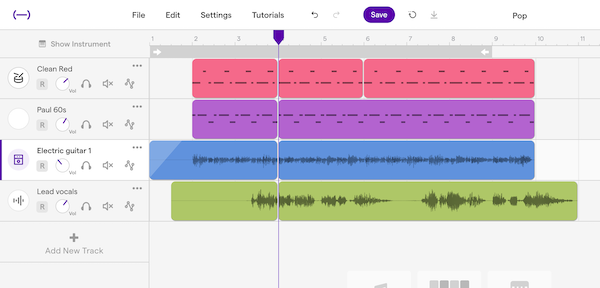
More musicians are choosing to make music online because it removes the biggest friction points: setup time, device limitations, and collaboration headaches. A modern online DAW opens in your browser, saves to the cloud, and makes it far easier to share a project with bandmates, clients, or students.
If you’re new to the concept, a DAW (digital audio workstation) is the core “studio software” where you record, arrange, and mix audio and MIDI—explained clearly in this overview of what a DAW is.
The real advantages (beyond “no download”)
Online tools have matured quickly, and many now cover the essentials: multitrack arranging, virtual instruments, built-in effects, and export options for publishing. For teams, cloud collaboration is the headline feature—multiple people can contribute parts asynchronously without passing giant project files around.
That said, skepticism is normal: “Can a browser handle real music production?” For many workflows, yes—because modern browsers are optimized for audio, and the heavy lifting (storage, sharing, sometimes even processing) is increasingly cloud-supported. Tools like Audiotool show how far web-based studios can go, especially for electronic production.
Browser-based vs desktop software (quick comparison)
If you’re worried about performance, keep your browser lean: close extra tabs, use wired headphones, and freeze/bounce tracks once your arrangement grows.

Which Are the Best Free Music Maker Online Platforms Available Today?
The best free music making software online usually comes in one of two forms: (1) a traditional cloud DAW with recording and arrangement tools, or (2) an AI-first generator that can output a full idea fast. The key is understanding what “free” actually includes—track limits, export quality, and whether advanced instruments/effects are paywalled.
For a broader roundup of free options across platforms, this curated list of free music-making software is a helpful cross-check. Below are the standout browser-based picks—plus the AI option that changes the speed of your workflow.
BandLab: The Go-To Choice for Cloud Collaboration
BandLab is a strong default when your priority is collaborative music production. It’s popular with bands, remote writing teams, and creators who want a frictionless way to record ideas, stack parts, and share revisions.
What makes BandLab especially attractive is how “complete” the free experience feels: you can sketch songs quickly, invite collaborators, and build momentum without fighting licensing prompts every other click. If your goal is consistent output and feedback, the community aspect is also a real advantage.
Best for: bands, songwriting circles, remote sessions, quick demos
Pros: collaboration-first workflow, generous free features, easy sharing
Cons: advanced mixing workflows can feel limited versus desktop DAWs
Try it here: BandLab
Soundtrap by Spotify: Perfect for Beatmakers and Podcasters
If you want a streamlined studio that supports both music and spoken content, Soundtrap is a smart pick. It’s frequently recommended as a beat maker online because loops and patterns come together fast—plus it includes podcast-friendly features that many music-only tools skip.
Soundtrap also benefits from Spotify’s ecosystem and product polish. For beginners, it’s less intimidating than many “pro” DAWs: you can start from templates, drag in loops, and record a vocal without needing to understand signal chains on day one.
Best for: beatmaking, songwriting, podcast production
Pros: strong loop library, approachable UI, good for teams/classes
Cons: some features and content libraries may be tiered
Explore it here: Soundtrap Music Makers
Audiotool: A Modular Paradise for Electronic Producers
Audiotool is for producers who enjoy building sound from the ground up. Instead of hiding complexity, it leans into a modular approach with virtual gear and routing—ideal if you’re making electronic music and want that “rack” feeling in the browser.
This is an electronic music maker that rewards curiosity. You can patch devices, experiment with synths, and design a distinctive sound—without installing a single plugin. It’s not the fastest for absolute beginners, but it’s one of the most fun if you like tinkering.
Best for: electronic producers, sound design learners
Pros: modular workflow, creative routing, distinctive production feel
Cons: learning curve is steeper than loop-first tools
Start patching here: Audiotool
Soundation: Best for Loop-Based Track Building
Soundation shines when you want to assemble a track quickly using loops, one-shots, and drag-and-drop arrangement. If your main goal is “make something that sounds finished today,” loop-based workflows can be incredibly motivating—especially for beginners.
Soundation’s library-driven approach also helps you avoid early technical traps. Instead of troubleshooting instruments and drivers, you focus on structure: intro, verse, drop, breakdown—then iterate.
Best for: quick accompaniment tracks, loop-based songwriting
Pros: intuitive arrangement, fast results, library-centric workflow
Cons: may feel restrictive if you want detailed sound design
Try it here: Soundation
MelodyCraft: The Ultimate AI Music Maker Online
Want a smoother way to test song ideas?
MelodyCraft helps you generate, compare, and refine ideas faster so you can keep moving.
If you want the biggest leap in speed and accessibility, MelodyCraft is an AI music maker online designed to turn text prompts into complete musical results. Instead of starting with an empty timeline, you start with an idea—mood, genre, tempo, vocals, instruments—and let the AI music generator produce a structured draft you can refine.
This is especially useful when you:
need a demo to pitch a concept,
want instant variations (for hooks, chord progressions, or vibe changes),
don’t play instruments but still want full songs—not just loops.
You can start here: MelodyCraft
A practical prompt example (copy/paste style): “Upbeat indie pop, 118 BPM, bright guitars, punchy drums, catchy chorus hook, female vocal, lyrics about starting over, modern radio mix.”
Demo: (Embed a MelodyCraft-generated audio or video preview here.) (Example placement: a 20–40s chorus preview with a “Download WAV” button.)
AI music tools are becoming mainstream fast, and you’ll see similar “prompt-to-song” positioning across the category (for example, this overview of an AI music generator)—but MelodyCraft focuses on getting you to a usable musical draft quickly so you can keep creating.

How Can Beginners Make Their First Song Online Easily?
If you’re Googling how to make music online for beginners, you don’t need a perfect setup—you need a finishable workflow. The fastest way to create music online is to choose one tool, pick a simple genre structure, and limit your choices for the first hour.
Below is a beginner-friendly 5-step process that works in most online DAWs (BandLab, Soundtrap, Soundation) and also adapts well if you start with AI and then polish.
Step 1: Pick a genre + BPM (don’t overthink it)
Choose a familiar lane:
Pop / indie: 95–125 BPM
Hip-hop: 70–95 BPM (or 140–190 double-time)
House: 120–128 BPM
Lo-fi: 70–90 BPM
Set BPM first so every loop and performance locks in.
Step 2: Build an 8-bar loop (drums + harmony)
Start with:
a drum groove (kick/snare/hat),
a bassline,
a chord instrument (keys/guitar/pad).
Aim for “good enough to repeat.” A strong 8-bar loop is the backbone of a full arrangement.
Step 3: Add a hook idea (melody or vocal line)
If you’re not sure what to write, try one of these:
Hum a simple 4–8 note motif and record it.
Use a lead synth and play notes in the chord scale.
Or generate a topline idea with an AI tool, then re-sing or re-play it.
Don’t start with the intro. Build the chorus/drop first—then create simpler sections around it.
Step 4: Arrange a basic song structure
Duplicate your loop across a timeline and create contrast:
Intro (4–8 bars): drums light, filtered chords
Verse (8–16 bars): fewer elements, more space
Chorus/Drop (8–16 bars): full drums + hook
Break (4–8 bars): strip back
Final chorus (8–16 bars): add a variation (extra harmony, riser, ad-libs)
This is where online tools shine: drag, duplicate, mute, and iterate.
Step 5: Quick mix + export
Do three beginner moves before exporting:
Pull down levels so nothing clips.
Add light reverb to glue elements.
Use a simple limiter on the master (if available) for loudness.
Export as WAV for best quality or MP3 if you just need a shareable preview.
If you want a visual walkthrough alongside these steps, a beginner video tutorial like this can help you see the flow end-to-end: beginner music production walkthrough.

Should You Choose a Traditional Online DAW or an AI Music Generator?
Choosing between an AI music generator and an online music studio (traditional DAW) is really about your goal: control vs speed. Many creators now use both—AI for ideation, DAW for editing, mixing, and final polish.
Here’s a decision table you can use in under a minute:
A practical hybrid workflow looks like this:
Generate 3–5 AI drafts for the same idea (different moods/tempos).
Pick the best chorus/hook.
Rebuild or import the concept into your online DAW for clean arrangement.
Record your own vocals/instruments on top.
Mix and export for release.
If you’re exploring the broader AI side of music creation, you’ll also see adjacent tools experimenting with AI-assisted audio generation—such as this category page on AI music. The key is to treat AI as a co-writer: fast ideas first, then human taste for final decisions.
What Are the Most Frequently Asked Questions About Making Music Online?
Ready to turn your best idea into a real track?
Try MelodyCraft when you want a clean path from concept to publishable song.
These are the questions that come up most often for anyone using a music maker online—especially when the end goal is uploading to streaming platforms or monetizing a free beat maker workflow.
Q: Is music made online automatically copyrighted to me?
A: In many regions, copyright attaches when a work is created—but ownership and usage rights can be affected by the tool’s terms, the sounds you used (loops/samples), and whether content is licensed. Always check the platform’s licensing language and export permissions before commercial release.
Q: Can I release online-made songs on Spotify and monetize them?
A: Often yes, but “yes” depends on the platform’s license and whether you used third-party samples/loops that restrict distribution. If the tool provides royalty-free loops for commercial use, you’re usually fine—just keep proof (project files, export logs, license pages).
Q: Will free tools add watermarks to my exported audio?
A: Some free tiers limit export formats, bitrate, or track/stem exporting; fewer add audible watermarks, but it can happen. Verify export settings before you commit to a platform for a full project—especially if you need WAV or stems.
Q: Do I need expensive gear to make music online?
A: No. A laptop + headphones is enough to start. If you record vocals, a basic USB mic helps, but it’s optional for beatmaking and AI-driven drafts.
Q: What’s the difference between loops and original composition?
A: Loops are pre-recorded audio building blocks; composition is creating your own melodies/chords/rhythms. Using royalty-free loops can still be “original” in arrangement, but the loop license determines what you can claim and how you can use it commercially.
Q: Is AI-generated music safe to use commercially?
A: It depends on the provider and the specific output terms. Some AI platforms allow commercial use under certain plans; others restrict it. If you’re researching how different AI music tools frame usage rights, resources like this guide on music maker online can help you understand common questions to ask—then confirm the exact terms inside the tool you choose.
Q: What if I want both speed and control?
A: Use AI to generate a starting point (hook, vibe, draft), then move into an online DAW to edit structure, replace sounds, and mix. This combo is currently the most efficient “creator” workflow in 2026.
Make Ready-to-Publish Music in Minutes 🎵
Go from idea to finished track quickly. No technical skills required.