

Vozart AI is best thought of as a fast AI music generator for creators who want beats, songs, vocals, and stems without a heavy DAW workflow. This review covers what it can realistically do, how the workflow feels, what to verify before publishing, and when a simpler workflow-first alternative like MelodyCraft may be the better fit.
From here, the article gets more practical: how Vozart handles beats, vocals, and stems; where iteration matters more than the first draft; and how to think about licensing, pricing, and alternatives when you want a workflow that gets you to usable music faster.
Bottom line in 3 lines:
Vozart is best for quick, “good-enough” songs and background tracks from text prompts.
It’s strongest when you need speed and variety, not surgical control of every musical detail.
Before publishing, treat licensing as a checklist item—not a guess.
Best fit if you’re:
A short-form video creator needing fresh BGM weekly
A marketer producing product teasers and ads at volume
A podcaster/YouTuber wanting intros, stingers, or beds
An indie game creator prototyping moods quickly (menu music, ambience)
What is Vozart AI, and what can you make with it?
Vozart AI (often searched as “vozart” or “vozart ai”) is a web-based tool that generates complete music tracks from prompts—typically letting you describe genre, mood, tempo, instrumentation, and sometimes lyrics to shape the result. You can explore the product and its current positioning directly on the official site: Vozart AI.
In practical terms, creators tend to use Vozart to produce:
Background music for TikTok/Reels/Shorts (loopable or sectioned)
Ad-friendly beds for product launches and promos
Simple themes for games (menu/level vibe sketches)
“Draft songs” to spark ideas before moving to a DAW
What you can typically expect to receive as results/exports (varies by plan and feature availability):
A full mixed audio track (final song render)
Instrumental-only versions (if supported for the generation/output)
Separated parts (stems) or vocal removal tools (when available)
Project metadata like prompt history, versions, and duration info
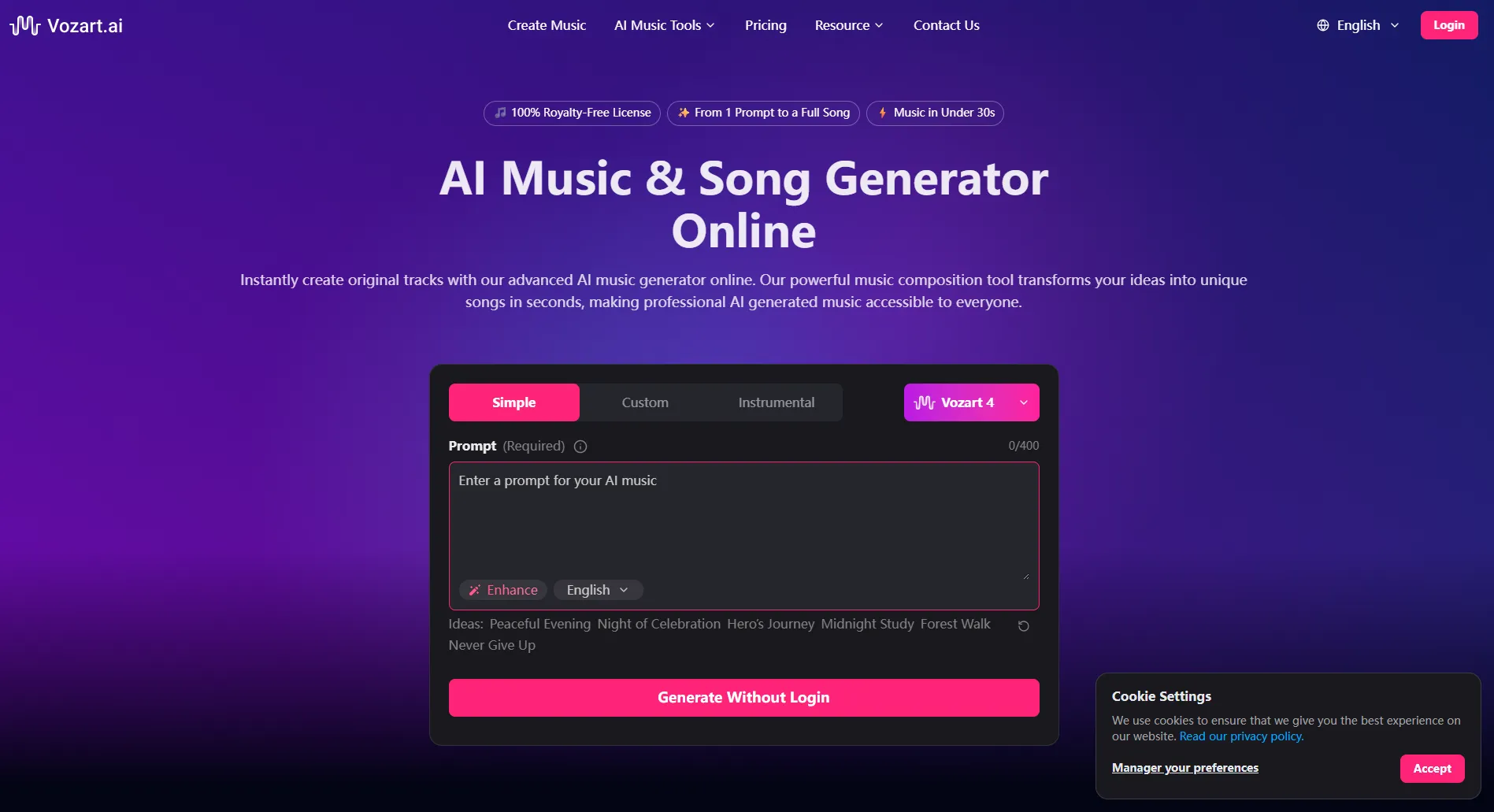
What Vozart generates (lyrics, vocals, instrumentals, stems)
When evaluating Vozart AI, it helps to separate “what it creates” from “what you can export.” For most content creators, the most valuable deliverables are the final mix (fast publishing) and instrumental/stem options (flexible editing around voiceovers).
Here’s a simple way to think about the output layers:
If you publish frequently, prioritize tools that make it easy to export instrumentals and/or stems, because they let you:
Duck music under dialogue
Remove distracting elements (busy drums, loud leads)
Re-cut sections to match your edit pacing
Who is Vozart for (and who may not be a good fit)?
Vozart is most useful when your goal is speed + variety. If you’re trying to ship content on a schedule, the value is less about making a perfect song and more about generating multiple usable options quickly.
A practical “should I use it?” view:
Who may not be a great fit (common friction points):
You need fully controllable arrangement (exact chord voicings, bar-by-bar automation, detailed articulations)
You require a specific, auditable rights chain for enterprise/legal workflows
You want a very specific singer timbre on-demand (and guaranteed repeatability)
How to generate a song in Vozart AI (a practical workflow)
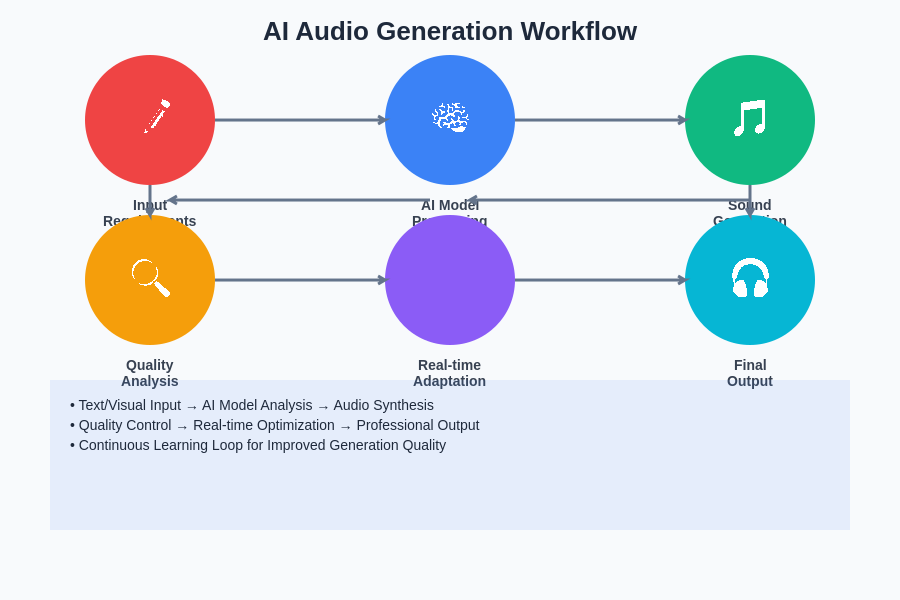
A good Vozart AI workflow is basically “prompt like a creative director, then curate like an editor.” You’re not writing every note—you’re steering outputs toward something usable.
Here’s a practical 7-step process you can repeat:
Pick the job first (use case): background loop, full song, ad bed, game ambience
Lock the vibe: genre + mood + energy (e.g., “warm lo-fi,” “high-energy electro pop”)
Set musical constraints: tempo range, instrumentation, era references (without naming exact copyrighted songs)
Write a structured prompt: include section plan (intro/verse/hook/bridge/outro) and mix notes
Generate multiple versions: don’t judge the tool from a single output
Choose the best “core minute”: keep the version with the best hook/groove, even if the rest is messy
Refine + export: adjust structure/pace if available, then export mix/instrumental/stems; optionally remove vocals for voiceovers
Generate 3–5 versions first, then refine only the best one. Iteration beats over-prompting.
Prompt template you can copy for better results
If your outputs feel random, it’s usually because your prompt is missing structure and mix intent. These templates are designed to be copied and edited.
Template 1: Pure BGM for short videos (no vocals)
Genre: [genre]
Tempo: [BPM range]
Mood: [3 adjectives]
Instruments: [lead instruments + rhythm section]
Structure: Intro (4 bars) → A (8) → B (8) → Break (4) → A (8) → Outro (4), loopable
Mix notes: clear midrange, light sidechain, avoid dense lead melodies
Reference vibes: “modern, platform-safe, non-derivative”
Template 2: Pop song with vocals (catchy hook)
Genre: modern pop / synth-pop / indie pop
Tempo: [BPM]
Mood: confident, uplifting, bright
Vocal style: clean lead, minimal runs, hook-forward (no celebrity imitation)
Instruments: punchy drums, warm bass, bright synths, subtle guitars
Structure: Intro → Verse 1 → Pre-chorus → Chorus → Verse 2 → Chorus → Bridge → Final chorus
Lyrics theme: [your theme in one sentence]
Mix notes: hook vocal upfront, tight low end, chorus lift with added layers
Reference vibes: “radio-friendly energy without copying any specific song”
Template 3: Game / film atmosphere (cinematic loop)
Genre: cinematic ambient / dark sci-fi / fantasy underscore
Tempo: slow (60–80 BPM) or free-time feel
Mood: tense, spacious, evolving
Instruments: pads, soft piano, low drones, subtle percussion, sound-design textures
Structure: 30–60s loop with evolving layers every 8 bars
Mix notes: wide stereo, leave room for SFX, avoid harsh highs
Reference vibes: “original moodboard, trailer-like build without quoting themes”
Quick “bad vs good” prompt check:
How to iterate: versions, structure, and extending a short idea
If your first generation misses, don’t restart from scratch—iterate with intent. The key is to diagnose what’s wrong (arrangement, sound palette, rhythm, or mix density) and adjust one variable at a time.
Iteration checklist (use this like A/B testing):
Keep one anchor constant: same tempo or same core instrument
Change one variable: “less busy drums” or “stronger chorus lift”
Label versions by purpose: “VO-friendly,” “hook stronger,” “cleaner intro”
Steal the best parts: if your tool supports extending, keep the strongest section and rebuild around it
Extend short ideas by function:
add a 4-bar intro for editing flexibility
add a “no-drums” break for transitions
repeat the hook with slight variation for a longer cut
A simple way to turn a 20–30s idea into a full track is to plan edit points: intro hit, first lift, break, final lift. Even if the music isn’t “perfect,” having clear edit points makes it far more usable.

Want a faster workflow for music that is actually ready to use?
If Vozart feels like a lot of prompt tweaking, MelodyCraft gives you a simpler path from rough idea to publishable track.
Does Vozart AI make royalty-free music, and can you use it commercially?
This is the question that matters most once you move from “testing” to “publishing.” “Royalty-free” usually means you don’t pay ongoing royalties per use—but it does not automatically mean “no restrictions” or “safe in every scenario.”
Vozart’s current terms, plan limitations, and commercial allowances can change, so the safest source to verify is the official site: Vozart AI. In general, treat the plan you’re on as part of your proof.
This article isn’t legal advice. For any AI-generated music, confirm the licensing terms of your specific plan and keep records of your exports.
Pre-release self-checklist (practical and fast):
Confirm your subscription level allows commercial use (if you monetize)
Save the exported file + project/version info (date, prompt, track ID if available)
Check whether your platform (YouTube, TikTok, ad networks) has extra rules for AI music
Avoid prompting that asks for a copy of a specific copyrighted song or artist
If using voice features, ensure you have permission for any identifiable voice likeness
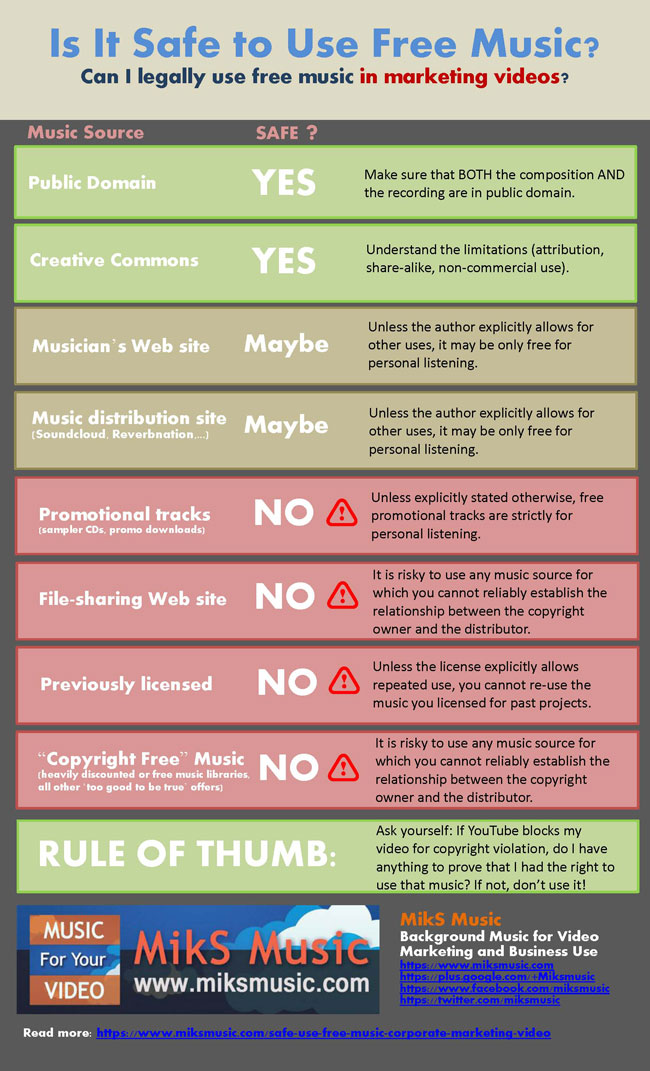
Common licensing questions (YouTube monetization, ads, client work)
Q: Can I use Vozart AI music for YouTube monetization?
A: Often yes if your plan includes monetization/commercial rights, but you should confirm what your subscription explicitly allows and keep export proof. To reduce risk, use original prompts (no “sound exactly like…”), and export instrumentals when you want fewer content ID conflicts.
Q: Can I run ads using Vozart-generated tracks (Meta/Google/TikTok ads)?
A: Ads are a higher-stakes use case because you’re using the track to sell something. Confirm commercial usage is included in your plan and keep a record of the exported asset. Risk reduction: generate multiple options and choose the one least reminiscent of known melodies; keep arrangements simple and brand-safe.
Q: Can I deliver Vozart tracks to a client (agency/client work)?
A: You’ll want to confirm whether the license allows transfer/sublicensing or if the client must hold their own subscription. Risk reduction: clarify ownership/usage in your invoice or deliverables note, and provide the client with the export documentation you saved.
What editing tools does Vozart include (stems, vocal removal, voice cloning)?
It helps to separate two stages: generation (creating the idea) and post tools (making it usable). In many AI music tools, editing features are what turn “cool demo” into “publishable asset.”
Common editing tasks Vozart AI users look for include:
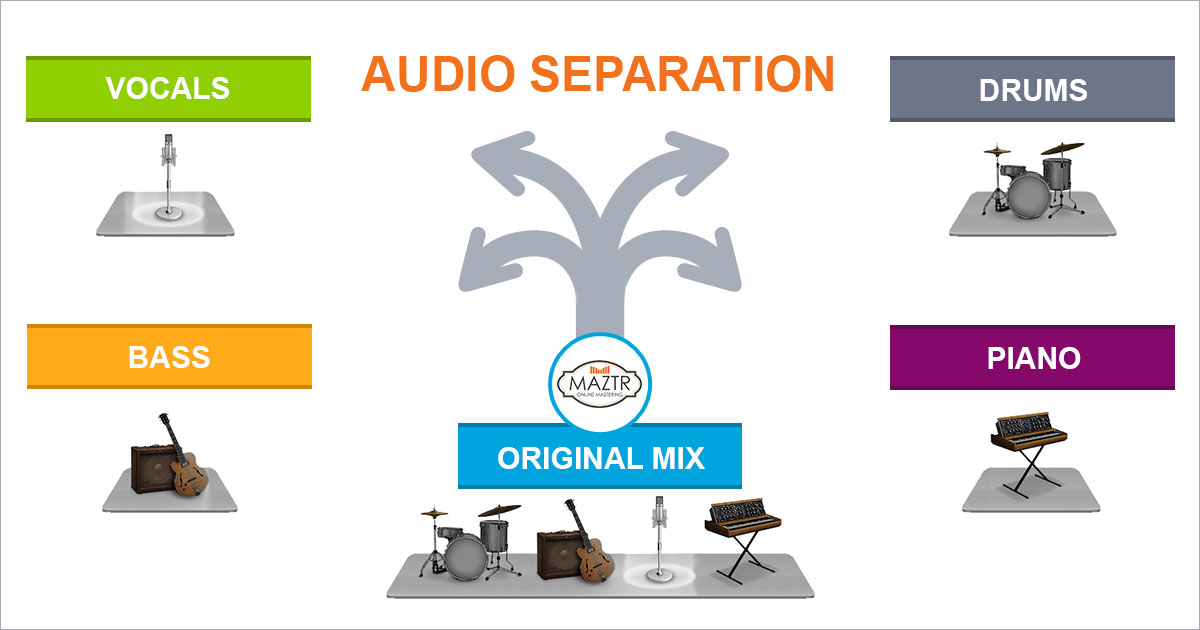
Stem separation / multitrack export: split drums, bass, harmony, vocals (when supported)
Vocal removal: create clean instrumentals for voiceover or alternate cuts
Voice features (including voice cloning in some tools): useful for consistent character/brand voice concepts, but comes with serious consent requirements
Basic edits: trimming, fading, extending, or generating variations for different durations
The practical question isn’t “does it have editing?” but: Can you quickly create a VO-friendly cut, a 15s ad cut, and a 60s cut without rebuilding from scratch?
When stem separation helps most (remixes, cleaner mixes, sound design)
Stem separation is most valuable when you’re trying to make AI music fit around other content. Three concrete examples:
Cleaner mixes under narration: lower the music bed while keeping a rhythmic pulse by reducing drums or pulling back synths.
Edit alignment: cut sections to match video transitions without awkward “half-beat” jumps—stems can hide seams better than a full mix.
Sound design and branding: isolate a signature element (pluck, arp, drum) and reuse it as a brand motif across videos.
Boundary check (set expectations): stems from an AI separation/export can be extremely useful, but they may not behave like true studio multitracks—there can be bleed, artifacts, or less precise isolation.
Voice cloning: what it’s good for and what to be careful about
Voice cloning (when available in an AI tool ecosystem) can be useful for:
Maintaining a consistent “character voice” for demos and internal concepts
Creating placeholder vocals before hiring a singer
Rapidly testing melody + lyric fit across different vocal tones
But it’s also the fastest way to get into trouble if you’re careless.
Best practices to stay on the safe side:
Only clone voices you have explicit permission to use
Avoid prompts that request a recognizable celebrity or specific artist voice
If you’re producing for clients, document consent and usage scope
Is there a Vozart desktop app (Mac/Windows) and how does it compare to the web version?
Many users search this because they want a dedicated workspace, fewer browser tabs, and more stable session management. Vozart is primarily web-based, but you may find desktop-wrapper options that let you run it in an app-like container.
One directory-style place people use to access an “app experience” is WebCatalog’s Vozart AI listing. Whether that’s worth it depends on your workflow.
How desktop-style access compares to the web version:
Best for: frequent users who want window management, quick switching, and fewer distractions
Potential drawbacks: it’s still essentially the web app underneath; offline use usually isn’t the point
Practical tip: if you manage multiple brands/projects, separate windows/profiles can reduce prompt/history mix-ups
Vozart AI pricing: what you get on free vs paid plans (and how credits usually work)
Vozart AI pricing can change, so instead of locking you into outdated numbers, the decision is easier if you compare plans by constraints (credits, exports, and rights). Check the current plan details on the official pricing area inside Vozart AI before you commit.
Here’s a “what to compare” table you can use:
How credits usually work (rule of thumb):
Longer tracks and higher-quality exports typically cost more credits
Iteration (multiple versions) is where most credits get spent
The best value comes from generating in batches, then refining only the winners
Vozart AI alternatives: when another tool is a better choice
Vozart AI is a solid option when you want prompt-to-song speed, but it’s not the only path. The better question is: what are you optimizing for?
Consider an alternative when you need:
More editing control: tighter structure editing, predictable sections, easier version management
A simpler content workflow: faster “publish-ready” background tracks with less tweaking
Team collaboration: shared libraries, repeatable templates, consistent brand output
More predictable costs: clearer output budgeting for weekly content schedules
If your main use case is “music for content” (intros, beds, social clips, quick ad cuts), you may prefer a workflow-first tool like MelodyCraft where the goal is speed to usable results—not endless prompting.
Try MelodyCraft if you want a simpler workflow for creating music for content
If you’re producing videos every week, the winning setup is usually the one that reduces decision fatigue: pick a vibe, generate options, export a cut that fits your timeline, repeat. That’s where MelodyCraft can be a strong fit—especially for creators who want quick BGM and template-like consistency.

A simple “choose it if…” rule:
Choose MelodyCraft if you want fast, content-ready background music with a streamlined workflow.
Stick with Vozart if you enjoy prompt experimentation and want to explore more song-style generations.
Quick verdict: should you use Vozart AI in 2026?
Use Vozart AI in 2026 if you want a prompt-driven way to generate songs quickly, test multiple vibes, and produce workable tracks for content without living in a DAW. It’s a practical tool when speed matters and you’re comfortable curating outputs like an editor.
Be more cautious if your work demands strict rights documentation, guaranteed repeatability of a specific voice or sound, or highly detailed arrangement control. In those cases, you may still use Vozart for ideation—but rely on a tighter production and licensing workflow before release.
Your next best step:
Run a quick test using the three prompt templates above
Do one licensing self-check before publishing anything monetized
Save export files and version details so you can prove what you generated and when
Make Ready-to-Publish Music in Minutes 🎵
Go from idea to finished track quickly. No technical skills required.